
📄Attendee Types
New Attendee Types
After you create a new event in the Noodle Live Portal, one of the first steps you need take as part of the event configuration is set up your attendee types - custom categories of event attendees.
Attendee Types are a powerful data structure as it allows you to group all of your event attendees based on different criteria for the following purposes:
1) Data reporting - you would be able to filter and customise all data based on the created attendee types.
2) Personalised Badge Designs - you can create different badge designs in terms of personalisation and assign them to different attendee groups. This allows you to print relevant information only depending on the attendee type.
Please note that each attendee created in the system will need to be associated with a relevant attendee type.
You can create unlimited attendee groups under the Attendee Types section in the platform.
To add a new Attendee Type:
1. Navigate to your event in the Portal and click on the “Add Attendee Type” button.

2. Enter the name for the attendee type you are creating and click on Save.

The new attendee type will now be available in the Attendee Types List table on the page.

You can use the Actions menu to:
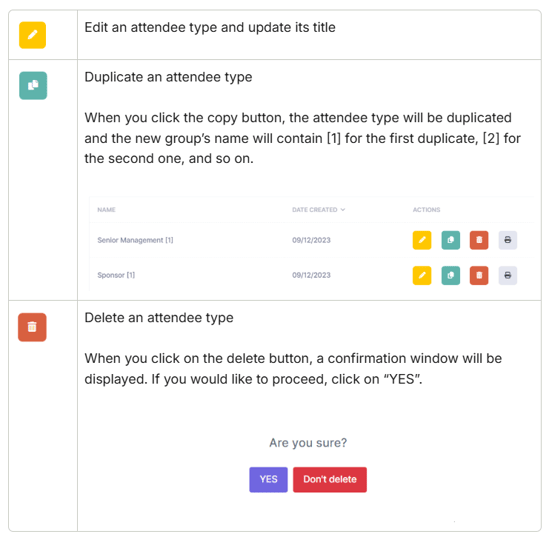
To export a list of all your attendee types, click on the “Export Data” tab under the "Quick Actions" menu, which will automatically download a spreadsheet containing the groups.


After you have set up your Attendee Types, it is time to configure your event's Data Fields.